

Okay, so you’ve heard of Inlinks. Maybe a friend mentioned it. Maybe you saw an ad. Or maybe you stumbled across it while searching for the best SEO tools. Whatever the reason, you’re here, and you want to know if Inlinks is worth the hype.
Well, you’ve come to the right place! I’ve been using Inlinks for a while now, and I’m ready to spill the tea. ☕️ No marketing fluff here, just my honest thoughts, plus answers to all your burning questions.
What is Inlinks, Anyway?
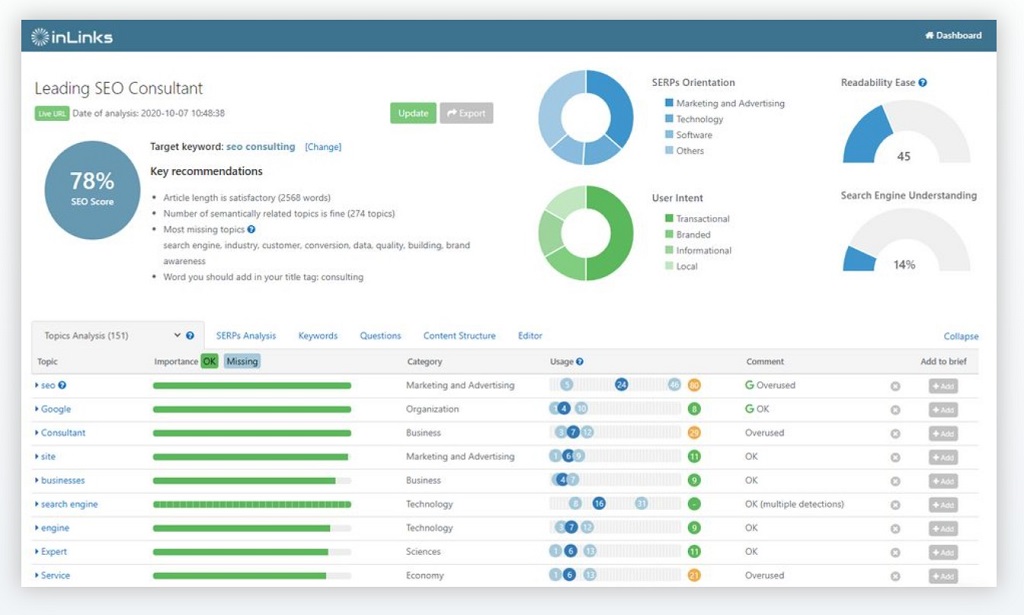
In a nutshell, Inlinks is an SEO tool that helps you build a strong internal link structure and optimize your content. Think of it as your website’s personal trainer, but instead of getting you ripped, it gets your website ripped… in the search engine results pages (SERPs), that is! 💪
But how does it do that? Well, Inlinks uses some pretty fancy AI magic to analyze your content and suggest relevant internal links. It’s like having a super-smart assistant who reads all your web pages and then says, “Hey, you know that article you wrote about X? You should totally link to it from this page about Y!”
Pretty cool, right?
Read More Also: Framer: Is it the Website Builder for You?
Why Should I Care About Internal Links?
Now, you might be thinking, “Internal links? That sounds kinda boring.” But trust me, they’re more important than you think.
Think of your website as a network of roads. Internal links are the signs that guide visitors (and search engine crawlers) to different destinations on your site. Good internal linking helps people find what they’re looking for, keeps them engaged, and tells Google that your website is well-organized and authoritative.
According to a study by Moz, internal links are one of the top ranking factors for Google. So, if you want your website to climb the SERPs, you gotta get those internal links in order.
What Makes Inlinks So Special?
Okay, so there are a bunch of SEO tools out there. What makes Inlinks stand out from the crowd? Here are a few things I love about it:
- It’s super easy to use. Even if you’re a total newbie to SEO, you can figure out Inlinks in no time. The interface is clean and intuitive, and the tool guides you through the process.
- It’s powered by AI. Inlinks uses some seriously smart technology to analyze your content and suggest the most relevant internal links. This saves you a ton of time and effort, and ensures your links are actually helpful to your readers.
- It does more than just internal links. Inlinks also helps you optimize your content for relevant keywords, improve your site architecture, and even build a knowledge graph. Talk about a multi-tasking marvel!
- It integrates with other tools. Inlinks plays nicely with other popular SEO tools like Google Search Console and WordPress, making it easy to incorporate into your existing workflow.
How Does Inlinks Work?
Alright, let’s get down to the nitty-gritty. How does Inlinks actually work? Here’s a simplified breakdown:
- You connect your website. First things first, you need to connect your website to Inlinks. This is super easy – just paste in your URL and you’re good to go.
- Inlinks analyzes your content. Once you’ve connected your site, Inlinks gets to work analyzing all your pages. It looks at things like your content topics, keywords, and existing internal links.
- Inlinks suggests relevant internal links. Based on its analysis, Inlinks suggests relevant internal links for each of your pages. It even tells you why it’s suggesting those links, so you can make informed decisions.
- You add the links to your content. You can then review the suggestions and easily add the links to your content with just a few clicks. No more manually searching for relevant pages to link to!
Inlinks Pros and Cons: The Good, the Bad, and the Ugly
No tool is perfect, and Inlinks is no exception. Here’s a balanced look at the pros and cons:
Pros:
- Saves Time: Seriously, this thing is a time-saver. No more manually hunting for relevant pages to link to.
- Improves SEO: By helping you build a strong internal link structure, Inlinks can give your SEO a serious boost.
- Easy to Use: Even your grandma could use Inlinks (okay, maybe not, but you get the idea).
- AI-Powered: The AI behind Inlinks is pretty impressive, and it makes the whole process much more efficient.
- Comprehensive: Inlinks offers a wide range of features beyond just internal linking, making it a valuable all-in-one SEO tool.
Cons:
- Pricing: Inlinks can be a bit pricey, especially for small businesses or individual bloggers.
- Occasional Glitches: Like any software, Inlinks can have the occasional glitch or bug. However, their customer support is usually pretty quick to resolve any issues.
- Can Feel Overwhelming: With so many features and options, Inlinks can feel a bit overwhelming at first. It takes some time to learn how to use all the features effectively.
Inlinks Pricing: How Much Does it Cost?
Okay, let’s talk about the elephant in the room: pricing. Inlinks offers a few different pricing plans, so you can choose the one that best fits your needs and budget. They have a free plan with limited features, which is great for trying out the tool. But if you want to unlock the full power of Inlinks, you’ll need to upgrade to a paid plan.
The paid plans vary in price depending on the number of websites you want to manage and the features you need. It’s best to check their website for the most up-to-date pricing information, as they occasionally offer discounts and promotions.
Inlinks vs. the Competition: How Does it Stack Up?
Inlinks isn’t the only SEO tool on the block. So how does it compare to the competition? Here’s a quick rundown:
- Inlinks vs. Link Whisper: Both tools are great for internal linking, but Inlinks offers more advanced features like content optimization and knowledge graph building.
- Inlinks vs. SurferSEO: SurferSEO is more focused on on-page optimization, while Inlinks takes a more holistic approach to SEO.
- Inlinks vs. SEMrush: SEMrush is a more comprehensive SEO suite with a wider range of features, but it’s also more expensive than Inlinks.
Ultimately, the best tool for you will depend on your specific needs and budget.
Inlinks FAQs: Your Burning Questions Answered
Still have questions about Inlinks? Here are answers to some frequently asked questions:
Q: Does Inlinks work with WordPress?
A: Yes! Inlinks has a WordPress plugin that makes it super easy to use the tool with your WordPress website.
Q: Can I use Inlinks on multiple websites?
A: Yes, you can. Inlinks offers plans that allow you to manage multiple websites from a single account.
Q: Is Inlinks worth the money?
A: In my opinion, yes. If you’re serious about improving your SEO and you want to save time on internal linking, Inlinks is definitely worth the investment.
Q: Does Inlinks offer a free trial?
A: Yes, they do! You can sign up for a free trial to test out the tool and see if it’s right for you.
Q: What kind of support does Inlinks offer?
A: Inlinks offers excellent customer support via email and chat. They also have a comprehensive knowledge base with helpful articles and tutorials.
Q: Can Inlinks help me get to the #1 spot on Google?
A: While Inlinks can significantly improve your SEO, there’s no magic bullet for getting to the #1 spot on Google. SEO is a long-term game that requires consistent effort and a variety of strategies.
Q: Is Inlinks difficult to learn?
A: Not at all! Inlinks is designed to be user-friendly, even for beginners. The interface is intuitive and easy to navigate.
Inlinks: My Final Verdict
So, what’s the final verdict? Is Inlinks worth it? In my experience, absolutely. It’s a powerful tool that can save you time, improve your SEO, and help you build a stronger website.
While it may not be the cheapest option out there, the value it provides makes it a worthwhile investment for anyone serious about their online presence. If you’re looking to take your SEO to the next level, I highly recommend giving Inlinks a try.


