Smart homes are becoming more popular every day. However, managing dozens of connected devices can quickly become overwhelming. Smart hubs solve this problem by acting as a central command center for your entire home automation system.
What Is a Smart Hub?
A smart hub is a device that connects and controls various smart home products from one place. Think of it as the brain of your smart home. Instead of using separate apps for your lights, thermostat, security cameras, and door locks, a smart hub brings everything together.
These devices communicate with your smart products using different wireless protocols. Additionally, they allow you to create automated routines and control everything through a single interface. This makes managing your connected home much simpler and more efficient.
How Smart Hubs Communicate With Devices
Smart hubs use several communication protocols to talk with your devices. Understanding these protocols helps you choose compatible products for your home.
Wireless Communication Protocols
The most common protocols include Wi-Fi, Zigbee, Z-Wave, and Bluetooth. Each protocol has its own strengths and weaknesses. Wi-Fi offers fast speeds and long range but consumes more power. Meanwhile, Zigbee and Z-Wave use less energy and create mesh networks that extend coverage throughout your home.
Bluetooth works well for nearby devices but has limited range. Therefore, most smart hubs support multiple protocols to ensure broad compatibility. This flexibility allows you to mix and match devices from different manufacturers without worry.
The Hub as a Translator
Different smart devices speak different languages. Your hub acts as a translator between these devices. For example, your Zigbee light bulbs cannot directly communicate with your Wi-Fi thermostat. However, the hub bridges this gap by translating commands between protocols.
This translation happens instantly and automatically. Consequently, you can create scenarios where devices using different protocols work together seamlessly. Your motion sensor can trigger your lights, adjust your thermostat, and send you a notification, even if each device uses a different communication method.
Centralized Control Through One Interface
Managing multiple apps becomes tedious quickly. Smart hubs eliminate this frustration by providing a single control point for everything.
Single App Management
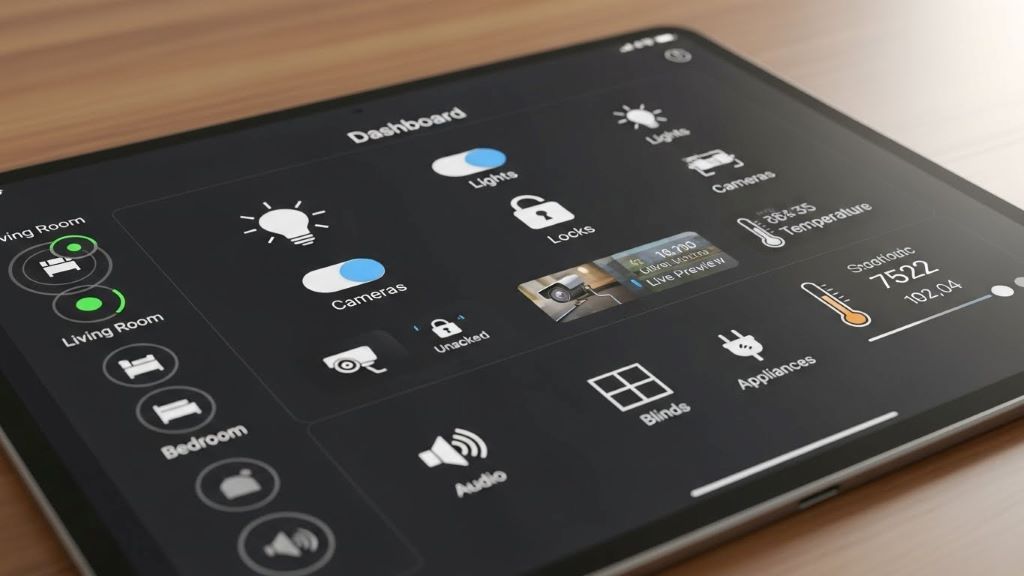
Instead of switching between five or ten different apps, you open one. Your hub’s app displays all connected devices in an organized dashboard. You can control lights in the living room, check your front door camera, and adjust the temperature without leaving the app.
This centralized approach saves time and reduces complexity. Moreover, it makes smart home technology accessible to everyone in your household. Family members do not need to learn multiple apps or remember different passwords.
Voice Control Integration
Most smart hubs integrate with popular voice assistants like Amazon Alexa, Google Assistant, or Apple Siri. This integration adds another layer of convenience. You can simply speak commands instead of reaching for your phone.
Voice control works across all your connected devices simultaneously. Therefore, you can say “goodnight” and watch as your hub locks doors, turns off lights, adjusts the thermostat, and arms your security system, all with one phrase.
Automation and Smart Routines
The real power of smart hubs lies in automation. These devices can execute complex sequences based on triggers you define.
Creating Custom Routines
Routines are predefined actions that occur automatically. For instance, your morning routine might gradually brighten bedroom lights, start your coffee maker, and raise the thermostat thirty minutes before your alarm. Your hub orchestrates all these actions without any input from you.
You can create routines based on time, location, device status, or sensor readings. Additionally, routines can include conditional logic. If the outdoor temperature drops below a certain point, your hub can automatically adjust indoor heating accordingly.
Responding to Triggers
Smart hubs monitor all connected devices continuously. When specific conditions are met, the hub springs into action. A door sensor detecting unexpected movement at night can trigger lights, sound alarms, and send alerts to your phone instantly.
These trigger-based automations enhance security and convenience. Furthermore, they help reduce energy waste by ensuring devices only operate when needed. Lights turn off automatically when rooms are empty, and heating adjusts when you leave home.
Enhanced Security and Monitoring
Smart hubs play a crucial role in home security systems. They coordinate multiple security devices to create comprehensive protection.
Real-Time Alerts and Notifications
When your hub detects unusual activity, it notifies you immediately. These alerts include detailed information about which sensor triggered the alarm and what action occurred. You can view camera feeds, check door lock status, and even communicate through smart doorbells, all from wherever you are.
The hub also maintains logs of all device activity. Therefore, you can review what happened in your home at any time. This record-keeping provides valuable insights and peace of mind.
Integration With Professional Monitoring
Many smart hubs connect with professional monitoring services. If your system detects a genuine emergency, the monitoring service can dispatch help automatically. This integration provides an extra safety layer beyond DIY monitoring.
According to CNET, smart home security systems continue to evolve with improved AI detection and reduced false alarms, making professional monitoring more reliable than ever.
Energy Management and Efficiency
Smart hubs help reduce utility bills by optimizing energy consumption across your home.
Intelligent Climate Control
Your hub coordinates heating, cooling, and ventilation systems for maximum efficiency. It considers factors like outdoor temperature, time of day, and occupancy patterns. Consequently, your home stays comfortable while using minimal energy.
The hub can also prevent energy waste by detecting when windows are open and temporarily pausing heating or cooling. These intelligent adjustments add up to significant savings over time.
Monitoring Power Usage
Many smart hubs track energy consumption for connected devices. You can identify which appliances use the most electricity and adjust usage accordingly. Some hubs even suggest ways to reduce consumption based on your patterns.
This visibility empowers you to make informed decisions about energy use. Moreover, you can set limits or schedules to prevent excessive consumption automatically.
Choosing the Right Smart Hub
Selecting the appropriate hub depends on your specific needs and existing devices.
Compatibility Considerations
First, inventory your current smart devices and their communication protocols. Choose a hub that supports these protocols. Additionally, consider future purchases and ensure your hub offers flexibility for expansion.
Some popular options include Samsung SmartThings, Amazon Echo Plus, Google Nest Hub, and Apple HomePod. Each has strengths in different areas, so research thoroughly before deciding.
Ecosystem Preferences
If you already use products from a specific manufacturer, their hub might offer the best integration. Apple users often prefer HomeKit-compatible hubs, while Android users might lean toward Google-based solutions. However, cross-platform hubs provide the most flexibility.
The New York Times Wirecutter regularly reviews smart home hubs and provides detailed comparisons to help consumers make informed choices.
Future of Smart Hub Technology
Smart hub technology continues to advance rapidly. Artificial intelligence and machine learning are making hubs smarter and more predictive.
Predictive Automation
Future hubs will learn your preferences and anticipate your needs without explicit programming. They will adjust settings proactively based on patterns they observe. This evolution will make smart homes truly intelligent rather than simply connected.
Expanded Interoperability
Industry standards like Matter are improving device compatibility across brands. This standardization means future smart hubs will control even more devices seamlessly. Consumers will have greater freedom to choose products without worrying about compatibility issues.
Conclusion
Smart hubs transform collections of individual smart devices into cohesive, intelligent home systems. They provide centralized control, enable powerful automation, enhance security, and improve energy efficiency. By acting as translators between different communication protocols, smart hubs eliminate the complexity of managing multiple devices and apps.
Whether you are just starting your smart home journey or expanding an existing setup, a quality smart hub serves as the foundation for a truly connected living experience. As technology continues to evolve, these devices will become even more capable, making our homes more responsive, efficient, and secure. Investing in the right smart hub today prepares your home for the innovations of tomorrow.
Frequently Asked Questions
-
Do I need a smart hub if I only have a few smart devices?
Not necessarily. If you only have a few Wi-Fi-enabled devices from the same ecosystem, their native apps might suffice. However, a hub becomes valuable when you want to create automations between devices or when you start accumulating products using different protocols like Zigbee or Z-Wave.
-
Can smart hubs work without an internet connection?
Many smart hubs can control local devices without internet, but functionality is limited. Local automations and device control often work offline, but remote access, voice assistant integration, and cloud-based features require an internet connection.
-
Are smart hubs difficult to set up?
Most modern smart hubs are designed for easy setup. You typically download an app, follow step-by-step instructions, and add devices one at a time. The process usually takes 15-30 minutes for basic setup, though adding many devices takes longer.
-
How much does a smart hub cost?
Smart hub prices range from around fifty dollars for basic models to over two hundred dollars for advanced systems. Some devices like Amazon Echo or Google Nest speakers include hub functionality, offering good value for beginners.
-
Will my smart hub become obsolete quickly?
Quality smart hubs receive regular software updates that add new features and device compatibility. Choosing a hub from an established manufacturer with strong support ensures longer usefulness. Most hubs remain functional and relevant for several years.
Related Topics:
Why Partnering with a Mobile App Development Company is Essential for Business
WellSaid Labs Explained: What It Is, How It Works & Who Uses It