Ever wondered why your internet speed sometimes feels like a snail’s pace? It might be time to look at your network cables. According to a study by IEEE, upgrading to higher category cables like Cat 6A can significantly boost your network performance. So, let’s dive into the world of Cat 6A cables, understand what they are, how they work, and why they might be the upgrade you need.
What is Cat 6A?
The Basics
Cat 6A, short for Category 6A, is an Ethernet cable standard defined by the TIA/EIA. The “A” stands for “augmented,” meaning it’s an enhanced version of the Cat 6 cable. Cat 6A cables are designed to support data transfer rates of up to 10 Gbps over a distance of 100 meters (328 feet) and operate at a frequency of 500 MHz.
Why It Matters
Think of Cat 6A cables as the superhighways of the internet world. They allow more data to travel faster and farther without interference. This is crucial for businesses and homes that rely on high-speed internet for streaming, gaming, and other data-intensive activities.
How Does Cat 6A Compare to Other Cables?
Cat 5e vs. Cat 6 vs. Cat 6A
- Cat 5e: Supports up to 1 Gbps at 100 MHz. It’s like a two-lane road—good for basic internet use but can get congested.
- Cat 6: Supports up to 10 Gbps at 250 MHz but only up to 55 meters. Think of it as a four-lane road—better but still limited.
- Cat 6A: Supports up to 10 Gbps at 500 MHz over 100 meters. This is your eight-lane superhighway—fast, efficient, and capable of handling heavy traffic.
Speed and Bandwidth
Cat 6A cables offer double the bandwidth of Cat 6 cables, which means they can handle more data at higher speeds. This makes them ideal for environments where multiple devices are connected to the network, such as offices, data centers, and smart homes.
Shielding and Crosstalk
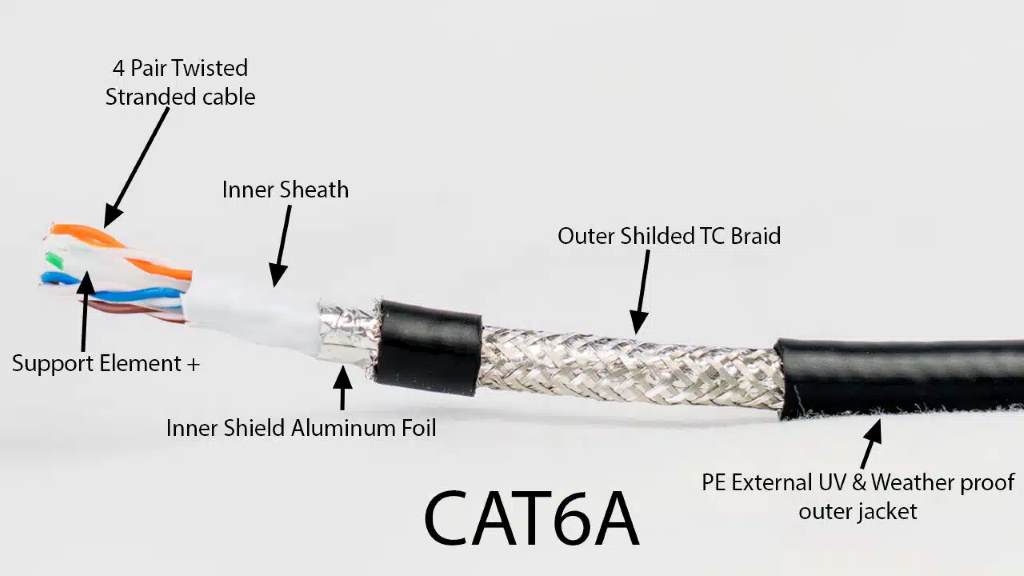
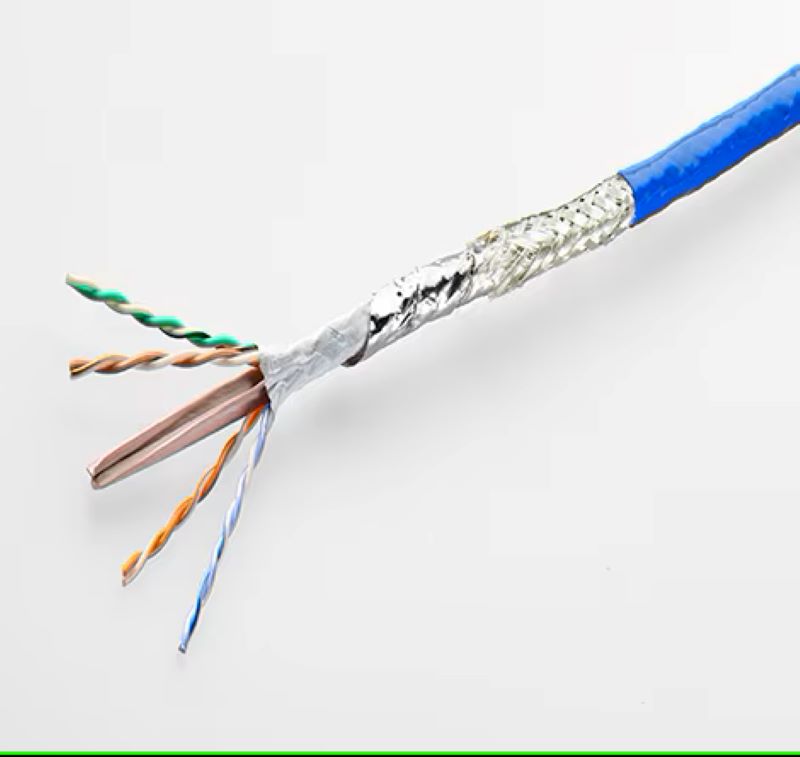
One of the standout features of Cat 6A cables is their enhanced shielding. They are designed to reduce crosstalk and electromagnetic interference (EMI), which can degrade the quality of your network signal. This is achieved through tighter twists in the cable pairs and additional shielding.
Benefits of Using Cat 6A
Future-Proofing Your Network
Investing in Cat 6A cables is like future-proofing your network. As technology advances and data demands increase, having a robust infrastructure in place ensures you won’t need to upgrade your cables anytime soon.
Improved Performance
With Cat 6A, you get consistent, high-speed internet without the lag. This is especially important for activities like video conferencing, online gaming, and streaming 4K videos, where any delay can be frustrating.
Enhanced Security
Better shielding means less interference and a more secure connection. This reduces the risk of data breaches and ensures that your information remains safe.
Cost-Effective in the Long Run
While Cat 6A cables might be more expensive upfront, they save you money in the long run by reducing the need for frequent upgrades and maintenance.
How to Install Cat 6A Cables

Tools You’ll Need
- Cat 6A cables
- RJ45 connectors
- Crimping tool
- Cable tester
- Wire stripper
Step-by-Step Guide
Step 1: Measure and Cut the Cable
Measure the length of cable you need and cut it to size. Always add a little extra length to account for any mistakes.
Step 2: Strip the Cable
Use a wire stripper to remove about an inch of the outer jacket. Be careful not to cut the inner wires.
Step 3: Untwist and Arrange the Wires
Untwist the pairs of wires and arrange them according to the T568B wiring standard:
- White/Orange
- Orange
- White/Green
- Blue
- White/Blue
- Green
- White/Brown
- Brown
Step 4: Trim the Wires
Trim the wires so they are all the same length, about half an inch from the jacket.
Step 5: Insert the Wires into the Connector
Carefully insert the wires into the RJ45 connector, making sure each wire goes into the correct pin. The flat side of the connector should be facing up.
Step 6: Crimp the Connector
Use the crimping tool to crimp the connector onto the cable. This secures the wires in place and ensures a good connection.
Step 7: Test the Cable
Finally, use a cable tester to check the connectivity. This will help you identify any issues before you plug the cable into your network.
Common Mistakes to Avoid
Using the Wrong Tools
Using the wrong tools can damage the cables and connectors. Always use a proper crimping tool and wire stripper.
Incorrect Wiring
Make sure to follow the T568B wiring standard. Incorrect wiring can lead to connectivity issues and poor network performance.
Not Testing the Cable
Always test the cable after termination. This helps you catch any issues before they become bigger problems.
Conclusion
Cat 6A cables are a significant upgrade over their predecessors, offering higher speeds, better performance, and enhanced security. Whether you’re setting up a new network or upgrading an existing one, investing in these cables is a smart move. They provide a future-proof solution that will keep your network running smoothly for years to come.